Why GTA 6 is the visual trend of the season
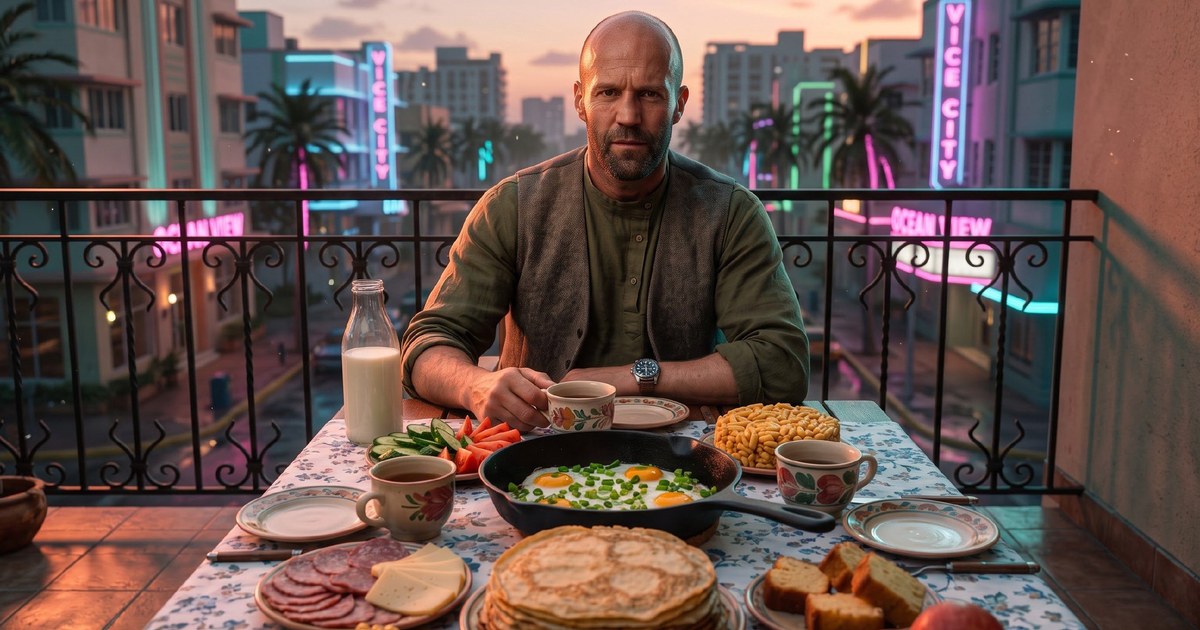
While everyone else rewatches trailers, some people already live inside a frame from the game. GTA 6 aesthetics are recognisable at a glance: pink-orange sunsets, palms, neon signs of Vice City, chrome and brass, expensive life with a hint of grit. That is why GTA frames took over social feeds — it is not just a meme, it is a ready-made visual language for avatars, stories and covers.
Not long ago such a shot required a console, the game and hours in Photoshop. Now one selfie is enough: the neural network repaints you as a game character while keeping your face.
What GTA 6 style AI photos are
AI photo generation takes your picture: the face, features and proportions come from your original, while light, clothing, background, optics and colour grading are drawn from a text description.
In GTA style that means:
- warm sunset light and film-like contrast;
- palms, neon, storefronts, water and chrome;
- RAGE-inspired rendering: exaggerated materials, gloss, brass highlights;
- poster-grade composition — a hero, a car and the city behind.
You are not pasting a face onto a screenshot: the scene is built from scratch, so light falls on the face correctly instead of sitting on top of the image.
What you get
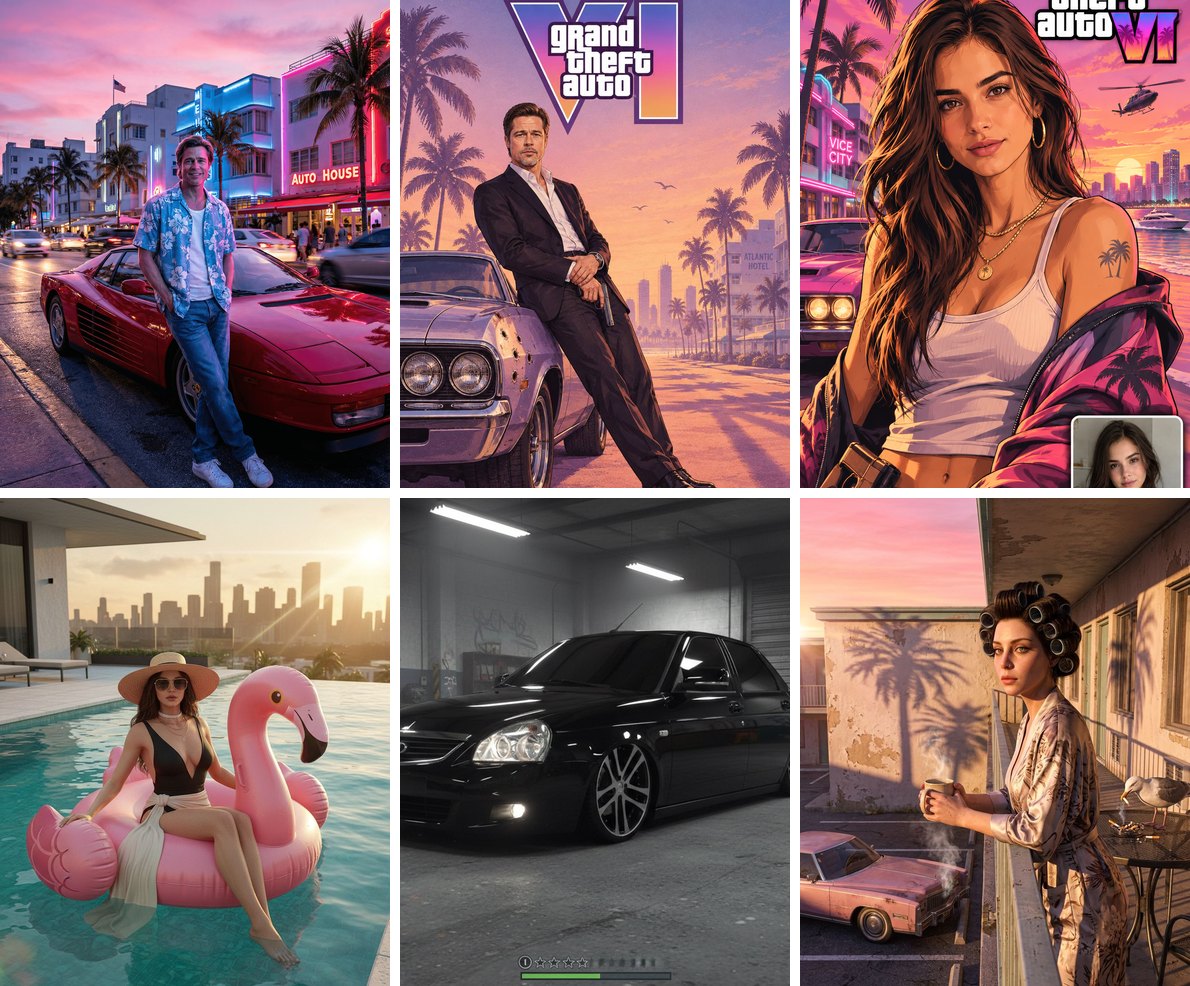
Every frame above was made from a regular user photo — no console, props or Photoshop. The catalogue already has ready templates in the “🎮 GTA 6” category:
- 🌆 Vice City photoshoot — a neon street, a convertible and sunset.
- 🌴 GTA VI key art poster — contour graphics and a heavy stare into the lens.
- 🎮 GTA VI loading screen — you as the main character of the loading screen.
- 🚗 Los Santos Customs screenshot — a tuning garage UI with your car.
- 🦩 Pink flamingo at sunset — an infinity pool, a villa and glamour.
- ☕ GTA 6 motel morning — a bathrobe, hair rollers, coffee and a pink Cadillac below.
How to make a GTA AI photo: step by step
- Prepare a photo. A front-facing portrait works best: the whole face in frame, even light, no sunglasses, hats or harsh shadows.
- Open the template catalogue — MindlyFlow AI photos — and pick the “🎮 GTA 6” filter. The category has 12 ready scenes.
- Choose a look. Poster, Vice City, loading screen, garage, motel or the swamps — or build your own frame in the AI photoshoot editor.
- Describe the scene in words if you want a custom shot: the prompts below can be copied as they are.
- Run the generation. One frame costs 4 tokens and takes 30 to 90 seconds.
- Download the result in full resolution — good for stories, covers and print.
Ready-to-use GTA prompts
Paste them into the description field — these phrasings are tested.
Key art poster:
turn me into a GTA VI poster character: contour graphics, dark plum outlines,
geometric shadows, sunset Vice City, palms and a neon sign behind, serious
stare into the camera, vertical frame
Neon Vice City street:
me in a frame from GTA VI: a neon Vice City street at sunset, palms and a pink-orange
sky, a sports car behind, warm rim light, glossy highlights on the paint,
light film grain, cinematic composition
Game loading screen:
a GTA VI loading screen with my face: illustrated art, dark background with neon
glow, the game logo on top, cinematic light and contour outlines
Car in a game frame:
my car on a GTA V screenshot: Los Santos Customs interface, tuning menu,
minimap and cash balance, in-game lighting, slight chromatic noise
How it differs from an in-game screenshot
No console, PC or game needed. The frame is drawn from a photo, not captured in a virtual world.
No Photoshop needed. Light, perspective and colour are recalculated together with the face, so the result does not look like a collage.
The face stays yours. Clothing, scene and mood change — recognisability stays.
Anything can be redone with one phrase. Another time of day, another car, another city — same photo, new prompt.
More styles from the category
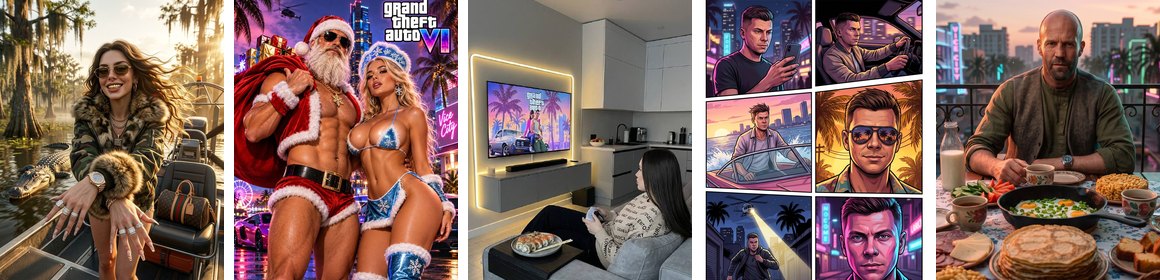
- 🐊 Swamp queen on an airboat — the Everglades, a nearby alligator and gold with diamonds.
- 🎅 Santa and the Snow Maiden in GTA VI — a New Year card in neon.
- 🎮 Home evening with GTA 6 — you on the sofa while the game runs on the TV.
- 🖼️ GTA VI cover collage — a grid of frames like a magazine cover.
- 🌆 GTA VI photo stylisation — your ordinary shot in classic GTA rendering.
Plus 🕹️ GTA San Andreas style selfie — if you want third-generation nostalgia.
5 ways to use GTA frames
- Avatar or banner — a recognisable look without costumes or a shoot.
- A story series “me in Vice City”: poster, loading screen and neon street in one set.
- A cover for a track, playlist, channel or podcast.
- A chat meme — a game-style frame always lands.
- A gift for a friend waiting for the release: their face on a GTA VI poster.
Checklist for a game-accurate result
- One face in frame. Group photos and reflections confuse the model.
- Front-facing angle. A profile or a strong head tilt causes distortion.
- Even light. A hard window shadow carries over into the result.
- Describe materials and light, not emotions: “neon and chrome at sunset” works better than “atmospheric”.
- Do 2–3 runs. Different seeds give different poses and angles of the same scene.
- Do not ask for “GTA style” alone — add the city, time of day and outfit.
Price and timing
- Price: 4 tokens per frame in the GTA 6 category.
- Time: 30 to 90 seconds per generation.
- Choice: 12 ready templates plus a free-form description mode.
- Privacy: uploaded photos are not published on the site.
FAQ
Do I need the game or a console? No. A photo and a text description are enough — the neural network draws the rest.
Is this official Rockstar artwork? No. GTA is a Rockstar Games trademark, and every frame here is fan-style content for personal, non-commercial use.
Will my face be preserved? Yes, that is the core of AI photos: the setting changes, not the person. The cleaner the source portrait, the higher the likeness.
Can I use my own car in the shot? Yes: upload a photo of the car — the “Los Santos Customs screenshot” and “Winter drift from above” templates keep the model and body details.
Can I post the result on social media? Yes, for personal non-commercial posts. For commercial use, check trademark rights.
Try it
Build your own set: GTA 6 templates in the catalogue or a free-form scene description. If you want to understand the technology itself, read the AI photoshoot guide, and if you need a background swap on an existing photo, try the photo editor guide.