What a Halloween AI photoshoot actually is
A Halloween neural photo shoot takes an ordinary photo of you and re-renders it as a Halloween character: a vampire, a witch, a sugar skull, a guest at a costume party. Your face stays yours — the lighting, wardrobe, makeup, background and mood of the frame change.
No costume, no makeup artist, no photographer and no location. You need one selfie and about a minute, and you get a portrait that looks like it was shot in a gothic interior or a moonlit autumn forest.
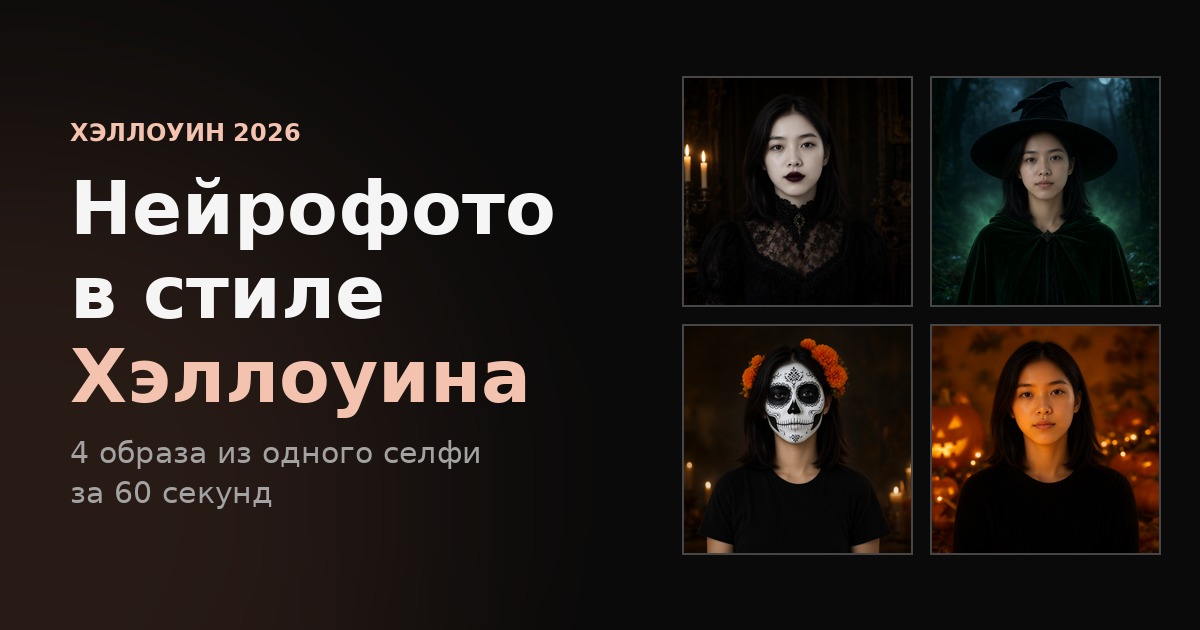
Four looks from a single selfie
The examples below were produced in the AI photoshoot editor from one neutral portrait. None of them was shot in a studio: it is the same photo and four different prompts.
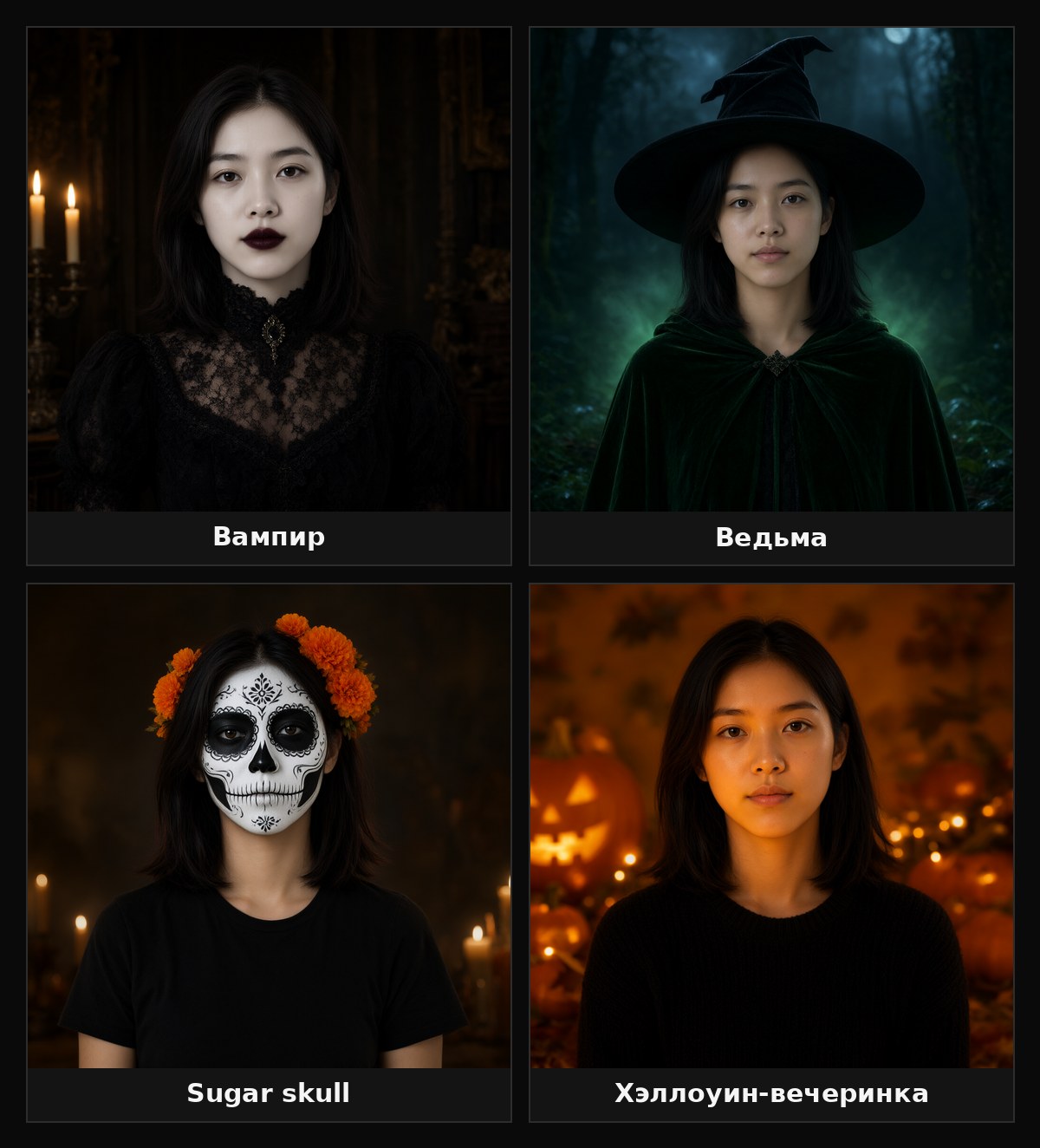
- Vampire — porcelain skin, dark lipstick, Victorian lace, candlelight from the side.
- Witch — a black pointed hat, a green velvet cloak, a misty forest and a cold moon behind.
- Sugar skull — Day of the Dead face paint, ornate black eye sockets, marigolds in the hair.
- Halloween party — warm pumpkin light on the face, string lights and jack-o’-lanterns out of focus.
Want something else? The catalogue already has styles such as Y2K horror, Noir portrait, Moody portrait and conceptual portrait, and any custom scenario can simply be described in words.
Why it beats a costume and Photoshop
No costume needed. A good Halloween look means a wig, coloured lenses, two hours of makeup and clothes you are afraid to ruin. AI photos deliver the same result without the fitting room.
No photographer and no location. A gothic mansion, a graveyard under the moon, a pumpkin farm — all generated instead of rented.
It is fast. Average generation time is around 60 seconds. By the time you decide what to wear to the party, the portrait is ready.
Your photos are not published. The selfie you upload is used only for your own generation: it never appears in a public feed.
You can re-roll as often as you like. Change one phrase in the description and you get a different frame. A real shoot cannot do that — you would have to start over.
How to make a Halloween AI photo: step by step
- Pick a photo. A frontal portrait works best: the whole face in frame, even lighting, no sunglasses, hats or hard shadows. A phone selfie is fine as long as the eyes and the oval of the face are visible.
- Open the AI photoshoot editor — AI photoshoot at MindlyFlow. To browse ready-made looks first, start with the template catalogue.
- Choose a style or describe your own. For a Halloween look the easiest route is “photo by description” plus one of the prompts below.
- Upload the selfie and start the generation. One photo — one look. Need four looks? Run four generations: the face stays, the surroundings change.
- Download the result. The frame comes back at full resolution — good enough for stories, an avatar, or a printed party invitation.
Ready-to-copy Halloween prompts
Paste the whole description — each one has been verified on real generations.
Vampire:
Make her a vampire countess: pale porcelain skin, dark red lips, a black Victorian
lace high-collar dress, candlelight from the side, a dark gothic interior behind
Witch:
Make her a witch: a black pointed hat, a dark green velvet cloak, a misty forest at
night behind her, cold moonlight with a faint green glow
Sugar skull (Day of the Dead):
Paint her face as a Day of the Dead sugar skull: white base, black eye sockets with
floral patterns, orange marigolds in her hair, a dark background with candles
Halloween party:
Put her at a Halloween party: warm orange pumpkin light on her face, carved
jack-o'-lanterns and string lights behind, a chunky black knit sweater, soft
background blur
More ideas that work well: a gothic bride in a veil, “just came back from a walk” zombie makeup, a horror-movie survivor with a flashlight, an Addams-family look, a pumpkin-latte lifestyle shot in an autumn park, a ghost in vintage sepia.
Before and after: what exactly changes
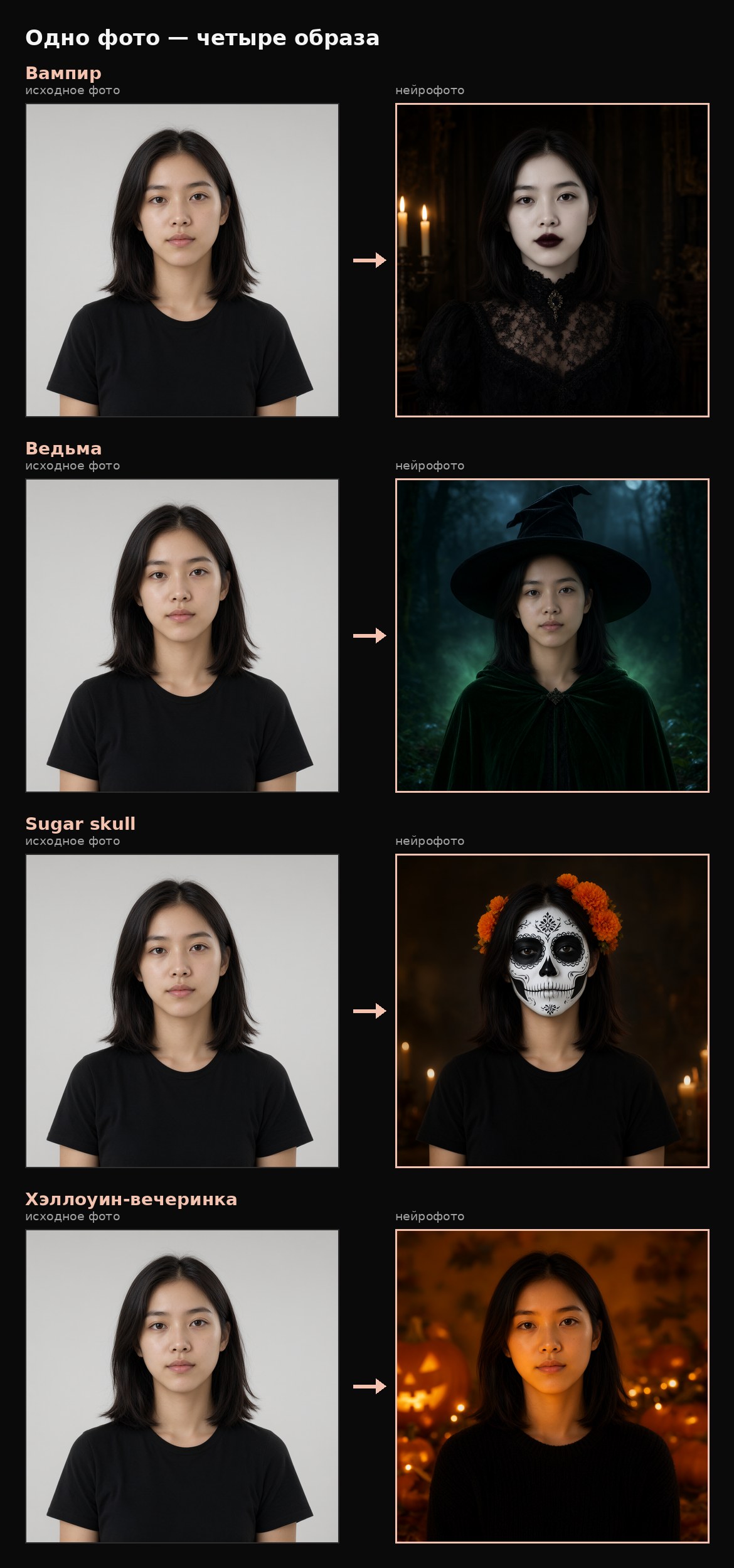
The model keeps the likeness — facial features, eye placement, lip shape — and rewrites everything else: makeup, clothing, light source, background and lens. That is why the frames read as a photo shoot rather than a collage with a mask: the light falls on the face in a new way instead of being pasted on top.
Checklist for a good result
- One face in frame. Group photos and mirror reflections confuse the model.
- Frontal angle beats a profile: fewer distortions.
- Even lighting. A hard window shadow across half the face carries into the result.
- No accessories. Glasses, scarves and masks stop the model from reading the face.
- Describe light and wardrobe, not emotions. “Candlelight from the side” works better than “spooky atmosphere”.
- Do not be afraid of several runs. Different seeds give different poses and angles of the same scene.
Price and timing
- Price: an AI photo of yourself starts at 3 tokens per look.
- Time: about 60 seconds per generation.
- Styles: 50+ ready-made looks in the catalogue plus a free-form description mode.
- Privacy: uploaded photos are not published on the site.
FAQ
Do I need a costume or makeup? No. The costume, makeup and location are generated — all you supply is a photo of your face.
Will it keep my face? Yes, that is the whole point of an AI photo shoot: the surroundings change, the person does not. The cleaner the source portrait, the closer the likeness.
Is a regular phone selfie enough? Yes, as long as the face is fully in frame and there are no hard shadows. Frontal shots in daylight are ideal.
Can I use the result on social media? Yes: avatars, stories, covers and party invitations are the standard use case.
What if I need a scene rather than a portrait? Then use the photo editor: it changes the background and surroundings of an existing shot without redrawing the face.
Try it
Halloween comes once a year; your avatar is there every day. Take one selfie and build your own set of looks: Halloween AI photos. If you want to understand the technology first, read the AI photoshoot guide.